July 2008
Monthly Archive
Monthly Archive
Posted by Chris Sterling on 04 Jul 2008 | Tagged as: Agile, Product Owner, Scrum, XP
At the last Scrum Trainer’s Retreat in Boston, MA, Lowell Lindstrom presented a 30-minute exercise on Affinity Estimating. Kane Mar has written a short blog entry on this technique for sizing a large Product Backlog here. I would like to add some context for the exercise and a step-by-step that I have found useful since using this and other similar techniques. Although I do not suggest having Product Backlogs of enormous size, this exercise has been successfully run in my presence with over 300 items in 2 hours. I recommend that this exercise is used when you have more than 20 items to size. When less than 20 I find that Planning Poker or a more sequential approach may be more appropriate.
Prerequisites
In preparation for this exercise, the Product Owner must have a list items in their Product Backlog which are to be sized by the Team(s). I suggest that the Product Backlog items are each put onto their own index card, post-it note, or better yet perforated and printable Avery index cards. Also consider holding the exercise in a room with a large wall that you can stick Product Backlog items onto. If you are using paper print outs of your Product Backlog items then you may need to bring blue painter’s tape or some other sticky substance to adhere them to the wall. You may also wish to bring stickers, black sharpies, extra index cards or post-it notes, and multi-colored markers.
Step 1: Silent Relative Sizing
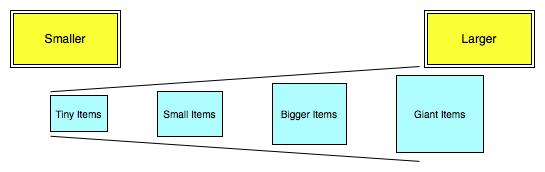
As shown above, place an X-Large post-it note or index card on the far left side of the wall with “Smaller” written on it. On the far right side of the wall place another which says “Larger”. Let the Teams know some simple guidelines which may help the relative sizing exercise, such as:
I have facilitated this exercise with teams of 5 to 45. When working with a larger number of team members it is important to use good facilitation techniques such as phased work in smaller groups at the wall. Please find resources on the Internet and with your HR department on facilitation for more specific tips when working with the large groups.
Run the silent relative sizing until all Product Backlog items are up on the wall or in the space reserved for questionable items. This can take anywhere from 5-20 minutes depending on the number of items and team members.
Step 2: Wikipedia-like Editing of Wall
Now it is time for Team(s) to edit the relative sizing on the wall. Ask team members to read the Product Backlog items on the wall and move them around as needed in either direction, smaller or larger. Explain to the Team(s) that we should be considerate of other team member’s estimates and therefore bring others into the conversation when appropriate before making extreme moves.
During this part of the exercise you may see some design discussions going on, thoughts about Product Backlog items which are missing, and increased clarifications needed from the Product Owner. Allow this to continue until the Team(s) begin to settle down and there seems to be little change happening on the wall. This may take 20-60 minutes to complete.
Step 3: Place Items into Relative Sizing Buckets
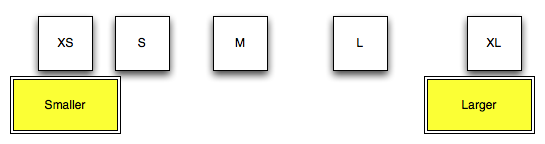
Once all of the Product Backlog items have been placed onto the wall and edited by the Team(s) our job is to get them placed in size buckets. Depending upon the nomenclature that the Team(s) decided to use place the sizes along the spectrum at the top of the wall between smaller and larger. For instance, if you are using Fibonacci sequence for your story point nomenclature, place the 5 further away from 3 than 3 is from 2 on the spectrum. If you are using T-Shirt sizing then may decide to use a doubling or just increasing spacing as sizes get larger. It should look something like the picture below after you put up the sizes:
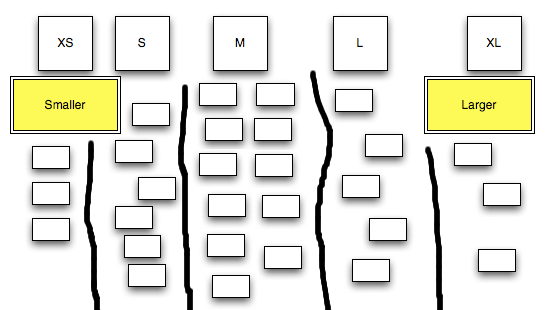
Ask the Team(s) to decide which size the Product Backlog items fit under based upon the relative size location on the wall. Explain that we need to make the sizing clear so leave space between buckets of sized items. After this has completed the wall may look something like the following:
Step 4: Product Owner “Challenge”
Once the Team(s) have sized the Product Backlog items on the wall the Product Owner is probably anxious to discuss some of the sizes. I usually give the Product Owner and any of their supporters a colorful pen or stickers to mark items they would like to discuss with the Team(s). This is also a good time for the Team(s) to take a 15-minute break to recover from the estimating work they have done so far.
It is important to tell the Product Owner and their supporters that the word “challenge” is not to disrespect the estimates of the Team(s). Be careful how you approach the challenge and make sure that you are communicating what about the item’s size was not inline with your thoughts of it’s size. I may even prepare them with some Planning Poker Tells that may be noticed by the Team(s) while they are challenging items.
When the Team(s) get back from break have them get comfortable and allow the Product Owner and supporters to ask about items they have marked on the wall. The Team(s) discuss their reasons for the size associated with each item. You can take multiple approaches in terms of changing sizes based on the Team(s) input:
Although the first of these choices seems best I have found the second to be sufficient in most circumstances. This step is completed once all of the challenged items have been discussed. This may take anywhere from 20-60 minutes.
Step 5: Get it into an Electronic Tool
Of course, we should make sure that the information is not lost once the estimating has been completed. Make sure to get the estimates into your tool of choice for Product Backlog management ASAP. I usually write the estimated size on each Product Backlog item before taking them off the wall and transferring into the tool.
What Else?
I found a few nuggets in running this exercise which I believe to be helpful:
Try it out and let me know in the comments if there are any additions or modifications you would like to make. I believe the Affinity Estimating exercise will be helpful to those dealing with large Product Backlogs in getting initial estimates. Thank you Lowell and Kane for exposing this exercise to us.





 GettingAgile.com