May 2009
Monthly Archive
Monthly Archive
Posted by Chris Sterling on 27 May 2009 | Tagged as: Agile, General, Java, Scrum, TDD, Uncategorized, XP
To reduce duplication and rigidity of the programmer test relationship to implementation code, move away from class and methods as the definition of a “unit” in your unit tests. Instead, use the following question to drive your next constraint on the software:
What should the software do next for the user?
The following coding session will provide an example of applying this question. The fictitious application is a micro-blogging tool named “Jitter”. This is a Seattle-based fictitious company that focuses on enabling coffee injected folks write short messages and have common online messaging shorthand to be expanded for easy reading. The user story we are working on is:
So that it is easier to keep up with my kid’s messages, Mothers want to automatically expand their kid’s shorthand
The acceptance criteria for this user story are:
The existing code already includes a JitterSession class that users obtain when they authenticate into Jitter to see messages from other people they are following. Mothers can follow their children in this application and so will see their messages in the list of new messages. The client application will automatically expand all of the messages written in shorthand.
The following programmer test expects to expand LOL to “laughing out loud” inside the next message in the JitterSession.
public class WhenUsersWantToExpandMessagesThatContainShorthandTest {
    @Test
    public void shouldExpandLOLToLaughingOutLoud() {
        JitterSession session = mock(JitterSession.class);
        when(session.getNextMessage()).thenReturn("Expand LOL please");
        MessageExpander expander = new MessageExpander(session);
        assertThat(expander.getNextMessage(), equalTo("Expand laughing out loud please"));
    }
}
The MessageExpander class did not exist so along the way I created a skeleton of this class to make the code compile. Once the assertion is failing, I then make the test pass with the following implementation code inside the MessageExpander class:
public String getNextMessage() {
    String msg = session.getNextMessage();
    return msg.replaceAll("LOL", "laughing out loud");
}
This is the most basic message expansion I could do for only one instance of shorthand text. I notice that there are different variations of the message that I want to handle. What if LOL is written in lower case? What if it is written as “Lol”? Should it be expanded? Also, what if some variation of LOL is inside a word? It probably should not expand the shorthand in that case except if the characters surrounding it are symbols, not letters. I write all of this down in the programmer test as comments so I don’t forget about all of these.
// shouldExpandLOLIfLowerCase
// shouldNotExpandLOLIfMixedCase
// shouldNotExpandLOLIfInsideWord
// shouldExpandIfSurroundingCharactersAreNotLetters
I then start working through this list of test cases to enhance the message expansion capabilities in Jitter.
@Test
public void shouldExpandLOLIfLowerCase() {
    when(session.getNextMessage()).thenReturn("Expand lol please");
    MessageExpander expander = new MessageExpander(session);
    assertThat(expander.getNextMessage(), equalTo("Expand laughing out loud please"));
}
This forced me to use the java.util.regex.Pattern class to handle case insensitivity.
public String getNextMessage() {
    String msg = session.getNextMessage();
    return Pattern.compile("LOL", Pattern.CASE_INSENSITIVE).matcher(msg).replaceAll("laughing out loud");
}
Now make it so mixed case versions of LOL are not expanded.
@Test
public void shouldNotExpandLOLIfMixedCase() {
    String msg = "Do not expand Lol please";
    when(session.getNextMessage()).thenReturn(msg);
    MessageExpander expander = new MessageExpander(session);
    assertThat(expander.getNextMessage(), equalTo(msg));
}
This forced me to stop using the Pattern.CASE_INSENSITIVE flag in the pattern compilation. Instead I tell it to match only “LOL” or “lol” for replacement.
public String getNextMessage() {
    String msg = session.getNextMessage();
    return Pattern.compile("LOL|lol").matcher(msg).replaceAll("laughing out loud");
}
Next we’ll make sure that if LOL is inside a word it is not expanded.
@Test
public void shouldNotExpandLOLIfInsideWord() {
    String msg = "Do not expand PLOL or LOLP or PLOLP please";
    when(session.getNextMessage()).thenReturn(msg);
    MessageExpander expander = new MessageExpander(session);
    assertThat(expander.getNextMessage(), equalTo(msg));
}
The pattern matching is now modified to use spaces around each variation of valid LOL shorthand.
return Pattern.compile("\\sLOL\\s|\\slol\\s").matcher(msg).replaceAll("laughing out loud");
Finally, it is important that if the characters around LOL are not letters it still expands.
@Test
public void shouldExpandIfSurroundingCharactersAreNotLetters() {
    when(session.getNextMessage()).thenReturn("Expand .lol! please");
    MessageExpander expander = new MessageExpander(session);
    assertThat(expander.getNextMessage(), equalTo("Expand .laughing out loud! please"));
}
The final implementation of the pattern matching code looks as follows.
return Pattern.compile("\\bLOL\\b|\\blol\\b").matcher(msg).replaceAll("laughing out loud");
I will defer refactoring this implementation until I have to expand additional instances of shorthand text. It just so happens that our acceptance criterion for the user story asks that AFAIK and TTYL are expanded, as well. I won’t show the code for the other shorthand variations in the acceptance criteria. However, I do want to discuss how the focus on “what should the software do next” drove the design of this small component.
Driving the software development using TDD focusing on what the software should do next helps guide us to only implement what is needed and with 100% programmer test coverage for all lines of code. For those who have some experience with object-oriented programming will implement the code with high cohesion, modules focused on specific responsibilities, and low coupling, modules that make few assumptions about other module they interact with will do. This is supported by the disciplined application of TDD. The failing programmer test represents something that the software does not do yet. We focus on modifying the software with the simplest implementation that will make the programmer test pass. Then we focus on enhancing the software’s design with the refactoring step. It has been my experience that refactoring refactoring represents most of the effort expended when doing TDD effectively.
Comments Off on Designing Through Programmer Tests (TDD)
Posted by Chris Sterling on 19 May 2009 | Tagged as: Acceptance Testing, Agile, Architecture, General, Leadership, Open Source, Product Owner, Scrum, Software Architecture, TDD, Travel, User Stories, XP
AgilePalooza is a one day Agile conference on Friday May 29th at the San Francisco State University downtown campus. There will be two tracks: Learning Agility and Advancing Agility.
“Learning Agility” will be presentation style whereas “Advancing Agility” will use the open space format.
Speakers include David Hussman (DevJam), Chris Sterling (SolutionsIQ), Luke Hohmann (Enthiosys), Lee Henson (VersionOne Services) with special guests Ainsley Nies (open space co-facilitator) and Ian Culling (VersionOne CTO). When not presenting for the “Learning Agility” track speakers will participate in the open space.
Space is limited and the cost is low so please register soon if you would like to attend. For more information or to register please visit www.AgilePalooza.com.
Where?
San Francisco State University Downtown Campus, 835 Market Street, San Francisco. (Powell street BART station in the Westfield Center) - Map/Directions
When?
9am-5pm (check-in and continental breakfast starts at 8am)
Cost?
$69
Register here: www.AgilePalooza.com
Comments Off on AgilePalooza in San Francisco May 29th
Posted by Chris Sterling on 17 May 2009 | Tagged as: Agile, Architecture, General, IASA, Leadership, Product Owner, Scrum, Software Architecture, XP
I have been using a tool for some time with clients and teams to find out what software quality attributes the product development team should focus on in the project. ISO standard 9621 describes the quality attributes found in software. The following image shows the 6 categories and specific attributes contained within them.

ISO 9621 Software Quality Attributes
Before I knew about this standard I would discuss how different quality attributes are in conflict with each other. For instance, if we write code that is focused on performance we lose some maintainability. It will be more difficult to read code focused on performance because readability will be sacrificed to some extent.
Now that I’ve known about ISO 9621 for many years, I made a simple spreadsheet tool to interview Product Owners, stakeholders, and software development team members with. Here is the Excel spreadsheet form of this tool:
Software Quality Attributes Rating Tool
Although a bunch of smart people have come up with ISO 9621, I found that modifying the software quality attributes rated in the tool worked more effectively with interviewees. This tool is not to decide what software attributes will be present in the software product getting developed. It is used to identify which software quality factors the team should put more emphasis on when making trade-off decisions during the project. Here is a list of the software quality attributes used in the tool:
Using the tool is quite simple:
Please let me know how you use this tool. There have been many teams that have taken up this tool and found it to be helpful for communicating what is most important from a software quality attibutes point of view in the project. Hope it does the same for you.
Posted by Chris Sterling on 01 May 2009 | Tagged as: Agile, General, Leadership, Product Owner, Scrum
Have you ever heard or said any of these phrases?
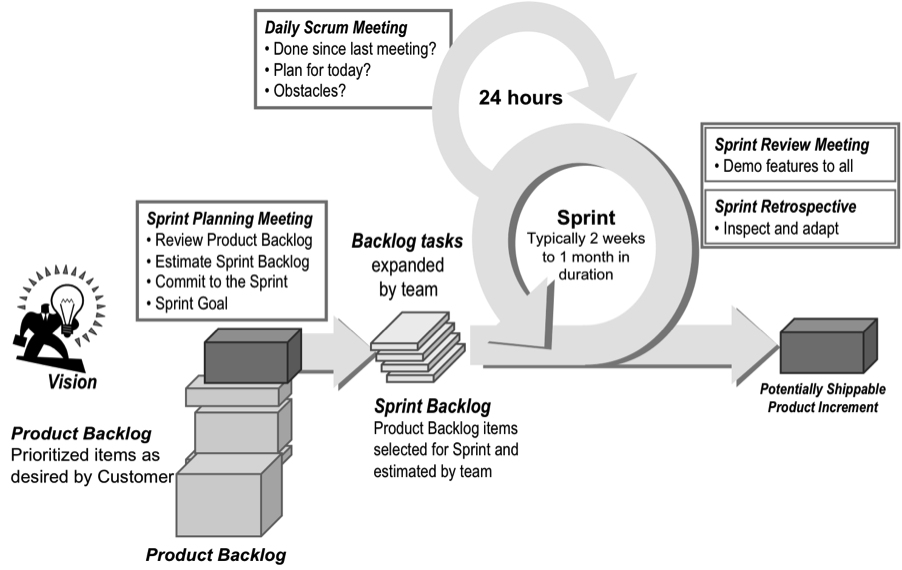
These may seem like innocuous statements but they are indicators of potential misinterpretation of how Scrum is best utilized. Scrum is not a full development process (although almost anything that has steps could be considered a ‘process’) and it is not a methodology. It does not tell you how to implement the software. It is a simple-looking framework that will help a group developing products figure out what is not working well so they can fix it. Here is the Scrum framework diagram:
At first, people and teams implementing Scrum focus on the process without understanding why and how to do each piece effectively. We believe that we will be “doing Scrum”, and will gain all of its benefits, by just:
This focus on going through the steps can be dangerous and frustrating for individuals, teams, and managers. Scrum is NOT A SILVER BULLET! No process, practices, or techniques are. Instead of focusing on the process, practices, and techniques of Scrum, I suggest individuals, teams, and management focus on the learning that can be produced by a team doing Scrum and act on that learning.
Scrum is an Empirical Process Control. The idea is that you plan and then do something, inspect what you did, and then adapt your behavior to improve on what you did. It is a learning framework for product development teams. This learning cycle is referred to as “inspect and adapt”. All 3 Scrum roles are involved in the learning: the Product Owner, ScrumMaster, and Developers (when I say developers I mean anybody needed to build the product, not just coders). In Scrum, there are 3 specific “inspect and adapt” cycles:
If you read my blog often, you might recognize this from a previous post called “A Kaizen Mindset” that has good information on how to use learnings and manage the impediments around those learnings.
Scrum is more of a tool than a methodology. It will make visible what is not going as well as it could be. It is then up to people in the team and organization to make changes to improve it. With each incremental improvement the product development team will move that much more effectively on its work. Rather than focusing on getting perfect at the steps in the Scrum framework, find out what can be improved in your delivery process and adapt it accordingly. If a part of the Scrum framework is difficult to do or seems like a waste then instead of eliminating that part, find out why it is difficult or wasteful in its adoption. There is usually a hidden impediment behind these difficulties and perceptions that if eliminated will allow the product development team to be more effective.
Scrum is not a destination. It is rather a tool that a product development team uses to continually inspect and adapt their way to more effective delivery. The destination should be your business and development team effectiveness goals. How can we deliver more product? How can we reduce time from inception of project to release? How can we release more often at a lower cost for release stabilization of the product? How can we reduce the risk in our project delivery and portfolio? The destination should be substantial and worthwhile. Scrum is just the vehicle to help get you there.



 GettingAgile.com